Microwaves
Microwave Not Spinning? Turntable and Noise Fixes
Microwave not spinning or making noise? The safe checks for the turntable, roller ring and coupler, which sounds are normal, and when to call a technician.
By Atlanta Appliance Techs · Published · Updated · 6 min read
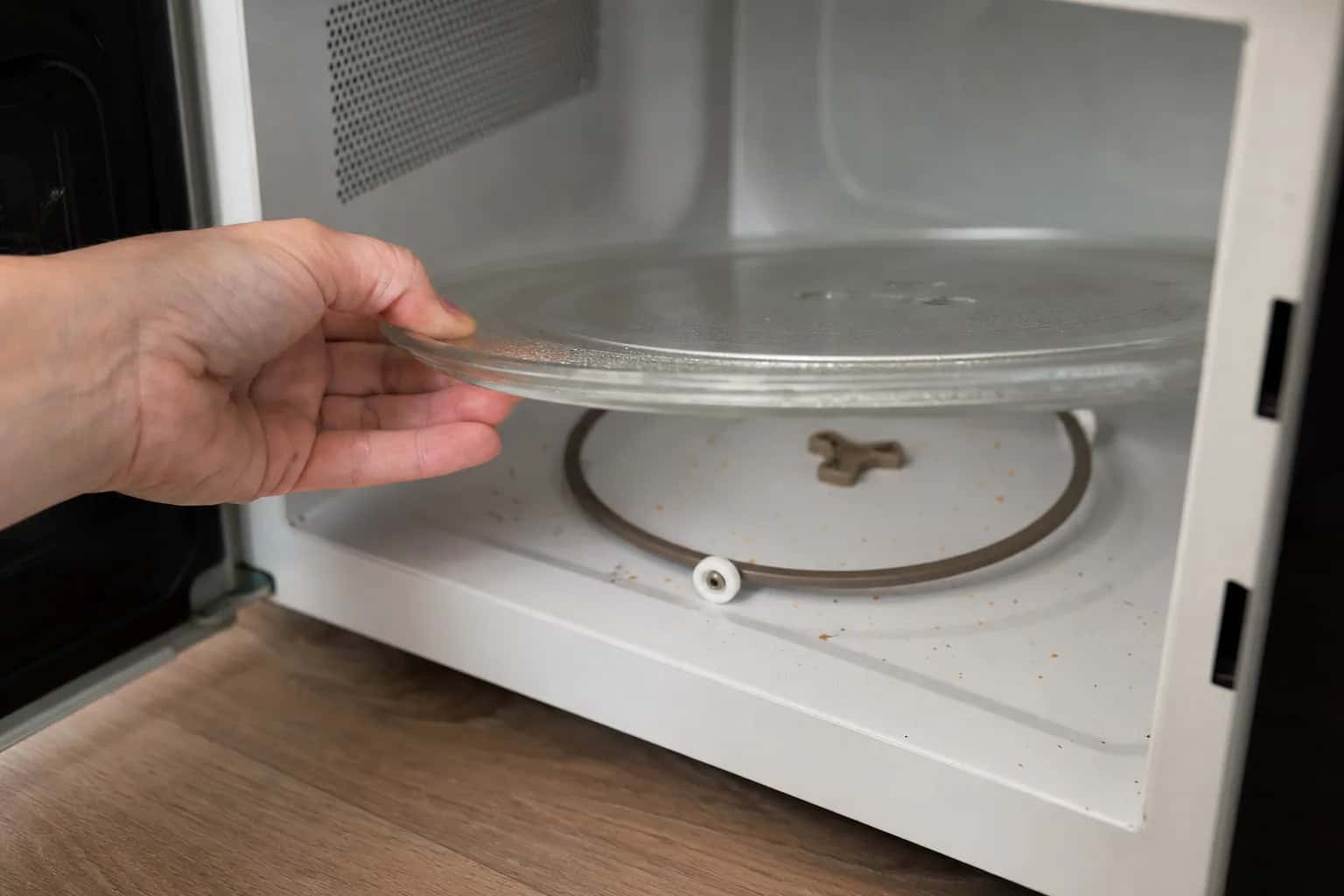
A microwave not spinning usually has a simple cause: the glass tray is off its coupler, the roller ring is out of its track or riding on crumbs, or the turntable has been switched off. All of those take a minute to check. If the tray is seated and switched on but still will not turn, the turntable motor under the floor has likely failed, and replacing it is a job for a technician.
Safety first: never open the cabinet
Every check here is done inside the cooking cavity, the part you use every day. Never remove the microwave's cover or outer cabinet, even to reach the turntable motor. The Consumer Product Safety Commission warns against do-it-yourself microwave repair because microwaves use high voltage and the shock hazard remains even after the oven is unplugged.
Microwave not spinning: checks you can do yourself
Let the tray cool, and unplug the microwave (or switch off the breaker for an over-the-range model) before you wipe under the ring.
- Seat the tray on the coupler. The coupler is the small plastic hub in the center of the floor; the ridges under the glass tray lock into it. Lift the tray, press the coupler down onto its shaft, then lower the tray until it drops into place. GE says the turntable should be centered, seated properly and right side up; upside down, it drags on the floor.
- Check the roller ring. The ring with small wheels sits in the round track on the floor, and each wheel should roll freely.
- Clean under the ring. GE says to make sure there is no food or debris under the wheels of the turntable ring. Wash and dry the tray and ring, and wipe the floor and track.
- Remove shipping material. On a new microwave, Whirlpool says to make sure all protective material is off the turntable and the tape is off the hub.
- Check the Turntable On/Off setting. Some models let you switch the turntable off, which Whirlpool says helps with oversized dishes or plates set side by side. If yours has a Turntable On/Off pad, press it to turn the turntable back on; your manual shows which button controls it.
- Start a cooking cycle, not the timer. GE says to be sure you are pressing a cook function rather than a timer function; a kitchen timer counts down without running the microwave. Test with a cup of water, never with the microwave empty.
- Confirm yours has a turntable. Some microwaves, such as microwave drawers, are built without one and have a flat floor. If yours came without a glass tray, check the manual before hunting for a missing part.
Microwave stopped spinning but still heats
If the tray is seated, the ring is clean and the turntable setting is on, but the plate still does not move while the microwave heats, the fault is usually the coupler or the turntable motor.
- Coupler: look at it with the tray off. If it is cracked, chipped or its center hole is rounded out, it can spin on the shaft without turning the tray. A replacement for your model number slips onto the shaft from inside the cavity.
- Turntable motor: Sharp's service manual describes the turntable motor as the part that rotates the turntable so food cooks evenly. If a sound coupler still does not turn the tray during a cooking cycle, that small motor under the floor has probably failed. It sits inside the cabinet, so on an over-the-range or built-in model, turntable motor replacement is a job for a technician.
A plate that has stopped turning also cooks unevenly, because food sits in the same hot and cold spots. Stir or rotate food halfway through until it is fixed; USDA recommends that even when a microwave has a turntable.
Turntable changes direction
Whirlpool says a turntable can rotate in either direction to help cook food more evenly, so one that turns one way on one cycle and the other way on the next is normal. The direction depends on how the motor starts.
Microwave making noise: what is normal
GE lists several sounds as normal:
- A thumping, clicking or hum while cooking at power levels below High, because the magnetron cycles on and off to make the lower power.
- Clicks from relays right after you start a cycle.
- A cooling fan that runs while the microwave is in use and for a short time after.
- A slight hum from the clock transformer, even when the microwave is not in use.
- On over-the-range models, a vent fan that comes on by itself when the bottom of the microwave gets too warm, and stays on until it cools.
A soft, steady hum from the turntable motor while the plate turns is normal too.
Turntable noise: thumping, rumbling or grinding
Whirlpool says a thumping or rumbling sound can occur if the turntable is not installed correctly or the support roller assembly is not working properly. Reseat the tray and ring, clean them, and wipe up spills in the cavity.
Popping or sparks are a different problem. USDA explains that arcing comes from microwaves reacting to gold paint on dishes, twist ties and other metal, and that turning the oven off at once should keep it from damaging the oven. Use plain microwave-safe dishes.
When to call a technician: a grinding or scraping noise that continues with the tray and ring seated and clean. A worn turntable motor or a problem under the floor is the usual cause.
A loud buzz with no heat: stop and call
A loud buzz, growl or harsh hum that is new, especially with food coming out cold, is not a turntable problem. It can point to the high-voltage parts that make the heat, such as the magnetron. Stop using the microwave, unplug it or switch off its breaker, and book a repair. Do the same for sparking that continues without metal inside, popping from behind the walls or a burning smell. Our guide to a microwave not heating explains those parts.
What usually fails
- Coupler: the tray wobbles, slips or turns only when nudged.
- Roller ring: a broken or stiff wheel causes thumping or a tray that stalls.
- Turntable motor: the tray is seated but will not turn, or the motor grinds.
- Magnetron or other high-voltage parts: a loud buzz with little or no heat.
- Fan motors: a rattle or grinding from the vents that starts and stops with the fan.
What it costs in Atlanta
We repair over-the-range and built-in microwaves. The diagnostic is $80, or $120 for a microwave-oven combo, and it is waived when you approve the repair. Repairs start at $180 plus parts, or $250 plus parts for oven-microwave combos, with a written flat-rate estimate before any work begins. When the part is in stock, the repair can often be finished on the first visit, and every repair carries our 60-day parts-and-labor warranty. See our pricing.
Repair or replace?
On a countertop microwave, a new coupler or ring is worth buying, but a turntable motor repair usually is not; a new countertop unit is usually cheaper, and we do not service countertop models. Over-the-range and built-in microwaves cost more and are fitted to your cabinets, so repair usually wins. Our guide to whether a microwave is worth repairing covers the decision.
Schedule a visit or read about our microwave repair service. Prefer to talk? Call (470) 778-4087.
Sources
- GE Appliances: Microwave turntable does not turn
- Whirlpool: Turntable not working, over-the-range microwave
- GE Appliances: Normal microwave operating characteristics
- Sharp: R-305DW microwave oven service manual (PDF)
- USDA FSIS: Cooking with Microwave Ovens
- CPSC: Electrocution Hazard with Do-It-Yourself Repairs of Microwave Ovens (PDF)
How we write and check these guides: editorial policy. Spot an error? Email hello@atlantaappliancetechs.com.
About Atlanta Appliance Techs
Atlanta Appliance Techs is a locally owned appliance repair company serving Metro Atlanta, including microwave repair in Atlanta. $80 diagnostic waived with the repair, 60-day parts-and-labor warranty, and gas, electric and induction appliances. More about us.